Skip to content
Wrytely

AI answer to handwritten Math

Turn an AI-solved answer into a handwritten page.

Solve a problem with ChatGPT or another AI tool, copy Wrytely's formatting prompt, then paste the ready answer into Math Mode.

3 simple stepsSolve with AI · Copy our prompt · Paste into Wrytely
Real Wrytely examplePNG
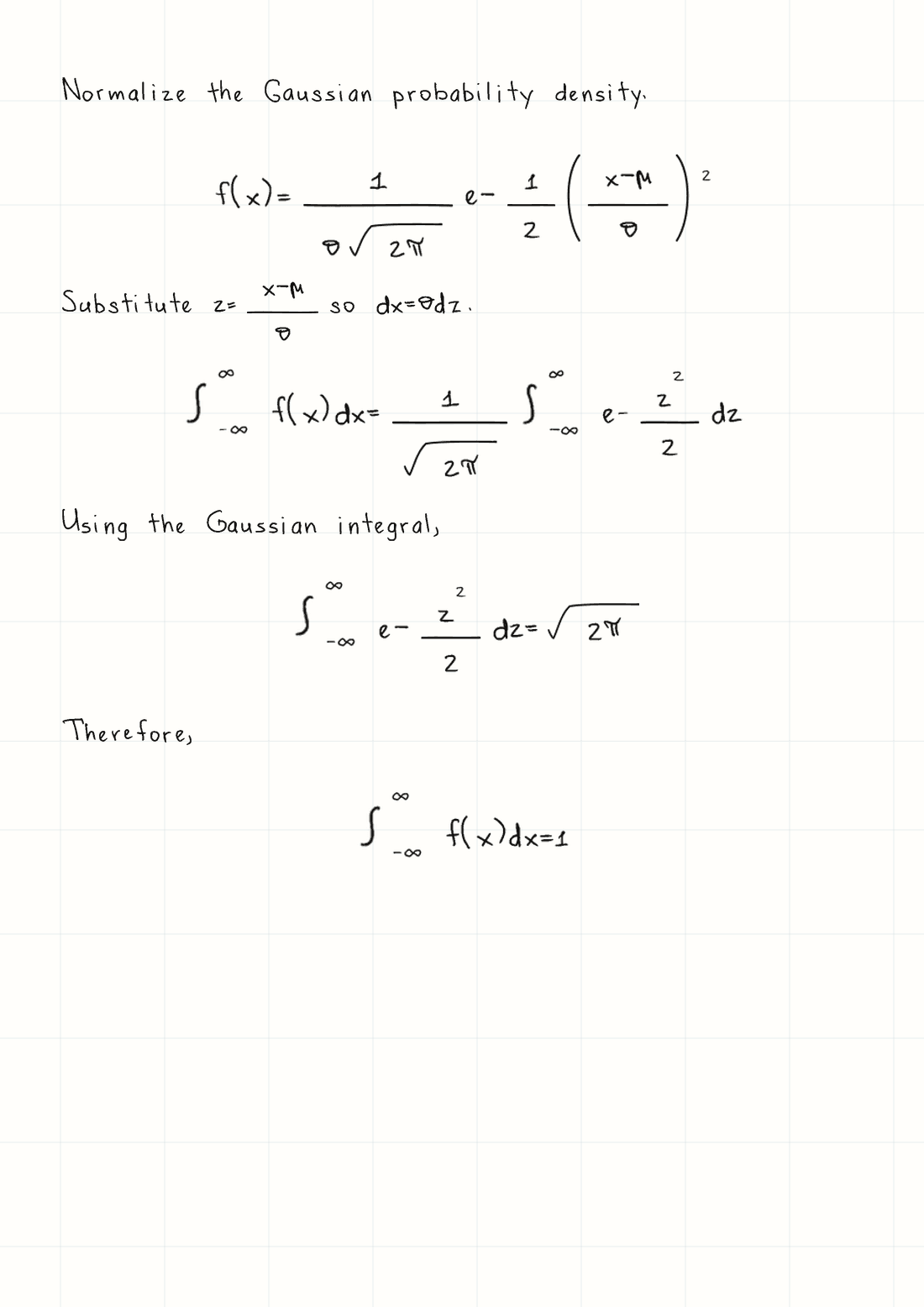
A real Wrytely handwritten Gaussian normalization with explanations, fractions, and infinite integrals
Real Wrytely PNG · Supplied solved Math · Graph paper · Black ink

Step by step

From an AI solution to Wrytely in three steps.

Wrytely turns a finished solution into handwriting. Let your AI tool solve the problem first, then use our ready-made prompt to put the answer in the exact format Wrytely needs.

  1. 01

    Ask AI to solve the problem

    Give the problem to ChatGPT or another AI tool. Ask for a complete solution and check that the answer looks right.

  2. 02

    Send the Wrytely prompt

    Use the copy button below and send our prompt in the same AI chat. It tells the AI how to format words, equations, and long lines for Wrytely.

  3. 03

    Copy the reply into Math Mode

    Copy the AI's newly formatted reply, paste it into Wrytely Math Mode, choose the page style, and generate your handwritten document.

What you paste into Wrytely

The AI returns one ready-to-copy block.

After you send our prompt, copy the AI's formatted reply into Math Mode. This real Wrytely page was generated from the exact input shown here.

Wrytely-ready inputCopy as plain text
Normalize the Gaussian probability density.
$$f(x)=\frac{1}{\sigma\sqrt{2\pi}}e^{-\frac{1}{2}\left(\frac{x-\mu}{\sigma}\right)^2}$$
Substitute $z=\frac{x-\mu}{\sigma}$ so $dx=\sigma dz$.
$$\int_{-\infty}^{\infty}f(x)dx=\frac{1}{\sqrt{2\pi}}\int_{-\infty}^{\infty}e^{-\frac{z^2}{2}}dz$$
Using the Gaussian integral,
$$\int_{-\infty}^{\infty}e^{-\frac{z^2}{2}}dz=\sqrt{2\pi}$$
Therefore,
$$\int_{-\infty}^{\infty}f(x)dx=1$$
The handwritten Wrytely output produced from the Gaussian example
Input and output match · Fractions, roots, powers, and integrals remain together

Step 2 · Copy into your AI chat

One click gives your AI the right format.

After the AI solves your problem, send this prompt in the same chat. The AI will return one clean block made for Wrytely.

How much explanation should stay?
Your Wrytely formatting prompt is ready.Copy it, send it after the solved answer, then copy the AI's new reply into Wrytely.

Choose how much explanation you want, then copy the prompt.

See the full prompt
Reformat the solution above for Wrytely so I can copy it once and paste it directly into Wrytely.

OUTPUT FORMAT — MANDATORY:
- Your entire response must be exactly one fenced plain-text code block labeled text.
- The first line of your response must be three backticks immediately followed by the word text.
- The last line of your response must be three backticks.
- Put the complete solution—every explanation, equation, step, and final answer—inside that single code block.
- Do not write any introduction, note, apology, heading, or other character before or after the code block.
- Do not create a second code block and do not split the solution into multiple boxes.
- The code block is only a copyable delivery box. Inside it, output raw plain text: keep every dollar sign and LaTeX backslash visible as a literal character. Never convert the equations into visually rendered math.
- Every LaTeX command must begin with exactly one backslash. Never double the backslash and never write escaped commands such as \\mathbf or \\frac.
- The outer code block is the only Markdown allowed.

WRYTELY CONTENT RULES — FOLLOW EVERY RULE EXACTLY:
1. Write ordinary explanations as plain text.
2. Put short inline math between single dollar signs, for example $x = 2$.
3. Put every important standalone equation on one compact line between double dollar signs, for example $$x^2 - 5x + 6 = 0$$. Split long equations into separate shorter $$...$$ steps at logical equals signs; use intermediate variables if needed.
4. Inside math, use Wrytely-safe LaTeX. Preferred structures and symbols include: \frac{a}{b}, \sqrt{x}, x^2, x_i, \pm, \times, \div, \cdot, \le, \ge, \neq, \approx, \propto, \infty, \sum, \prod, \int, \pi, \theta, \sigma, \mu, \lambda, \omega, \vec{x}, \hat{x}, and \bar{x}.
5. Use \left(...\right) or \left[...\right] only when scalable grouping is needed.
6. For a piecewise result, you may use one \begin{cases}...\end{cases} block with two to four simple rows. Do not use any other LaTeX environment.
7. Do not use \(...\), \[...\], HTML, matrix, pmatrix, bmatrix, aligned, align, equation, gather, split, overbrace, or underbrace.
8. Do not put explanatory words inside math delimiters. Put them before or after the equation as plain text.
9. Never use presentation or font commands: \mathbf, \boldsymbol, \mathbb, \mathcal, \mathsf, \mathtt, \mathit, \text, \mathrm, or \operatorname. If the source uses a bold vector such as \mathbf{E}, rewrite it as \vec{E}. If bold is only emphasis, remove the bold command and keep its contents.
10. Never use a mathematical answer box: do not use \boxed, \fbox, \colorbox, or \color. The required outer plain-text code block is only a copyable delivery container; it must not contain a boxed equation.
11. Replace \overline{x} with \bar{x} and replace \overrightarrow{x} with \vec{x}.
12. Write units with ordinary letters, for example $5 m$ or $8.854 \times 10^{-12} F/m$.
13. Do not escape the math delimiters: write $ and $$ literally, never \$ or \$$.
14. COMPACT LAYOUT: do not insert empty lines anywhere inside the code block. Put each explanation or equation directly on the next line. Combine consecutive algebraic transformations into one equation with equals signs when they fit clearly, instead of creating many tiny equation blocks.
15. Preserve every necessary calculation and the final result accurately, but remove repeated givens, repeated conclusions, decorative wording, and unnecessary intermediate lines.
16. Explanation level: Use at most one short plain-text sentence for each major calculation. Do not add headings, step numbers, repeated givens, summaries, or a separate final-answer label.

Before sending, silently verify that your response contains exactly one plain-text code block, that every part of the solution is inside it, and that nothing appears outside it.

Before you continue

Use the forms Wrytely handles best.

✓

Do this

  • Use $...$ for short Math and $$...$$ for a full equation.
  • Use one backslash before commands such as \frac, \sqrt, \sum, and \int.
  • Keep words outside the dollar signs and write units with ordinary letters.
  • Use compact fractions, roots, powers, subscripts, vectors, Greek letters, sums, products, and integrals.
×

Avoid this

  • Do not paste Math as an image or use \(...\) and \[...\] around equations.
  • Do not use matrix, aligned, align, equation, gather, or split environments.
  • Do not use font or answer-box commands such as \mathbf, \mathbb, \text, or \boxed.
  • Do not force one very long equation onto one line. Split it into readable steps first.

Questions

Answers before you start.

Does Wrytely solve or check the Math?

No. Wrytely formats the solved work you provide. It does not calculate, verify, grade, or correct the answer.

Where do the dollar signs go?

Put short Math inside one dollar sign on each side. Put an important full equation on one line inside two dollar signs on each side. Leave normal explanation text outside the dollar signs.

How should I shorten a long equation?

Split it at a useful equals sign. Put the next form on a new equation line, or give part of the equation a short name and continue on the next line.

What if my answer uses unsupported LaTeX?

Replace it with a simpler supported form before generating. If an unsupported part remains, Wrytely skips that part, reserves its space, generates the rest, and shows a warning.

Can Math use my own handwriting?

Yes. With Pro, first save a personal text style, then complete Math template pages 4 and 5. Supported Math characters can then use your supplied samples where available.

Keep going

Ready

Your solved answer is ready for handwriting.

Copy the Wrytely prompt into your AI chat, paste the formatted reply into Math Mode, and generate the finished PNG or PDF.

Copy the Wrytely prompt